Social Media Automation: How to Save Time, Create Better Content, and Grow Your Business
Social media has become one of the most important ways for businesses to connect with customers, build their brand, and generate sales. But managing social media consistently can be difficult.
Creating posts, writing captions, finding hashtags, designing images, scheduling content, replying to customers, and checking analytics can take hours every week.
This is where social media automation can make a major difference.
Social media automation uses software, workflows, and AI-powered tools to handle repetitive social media tasks automatically. Instead of manually doing everything for every platform, businesses can create a system that handles much of the work for them.
In this article, we’ll explain what social media automation is, how it works, what you can automate, its benefits, and how businesses can use it effectively.
What Is Social Media Automation?
Social media automation is the process of using software or automated workflows to manage repetitive social media tasks with minimal manual effort.
For example, instead of manually publishing the same type of content every day, you can create a workflow that:
- Generates a content idea.
- Creates a social media caption.
- Generates or selects an image.
- Adds relevant hashtags.
- Sends the content for approval.
- Publishes it at a scheduled time.
- Records the post in a content database.
- Collects performance information.
The goal isn’t to remove humans from social media.
The goal is to remove repetitive work so people can spend more time on strategy, creativity, and customer relationships.
Why Is Social Media Automation Important?
Running social media manually sounds simple until you actually have to do it every day.
A business may need to manage Facebook, Instagram, LinkedIn, TikTok, Pinterest, YouTube, and other platforms. Each platform may require different content formats and publishing schedules.
Doing everything manually can lead to:
- Missed posting schedules
- Repetitive content
- Inconsistent branding
- Wasted time
- Forgotten posts
- Poor organization
- Difficulty managing multiple platforms
Automation can create a structured system that keeps your content workflow organized.
For example, a business could prepare a month of content ideas and allow automation to handle scheduling and publishing throughout the month.
What Can You Automate?
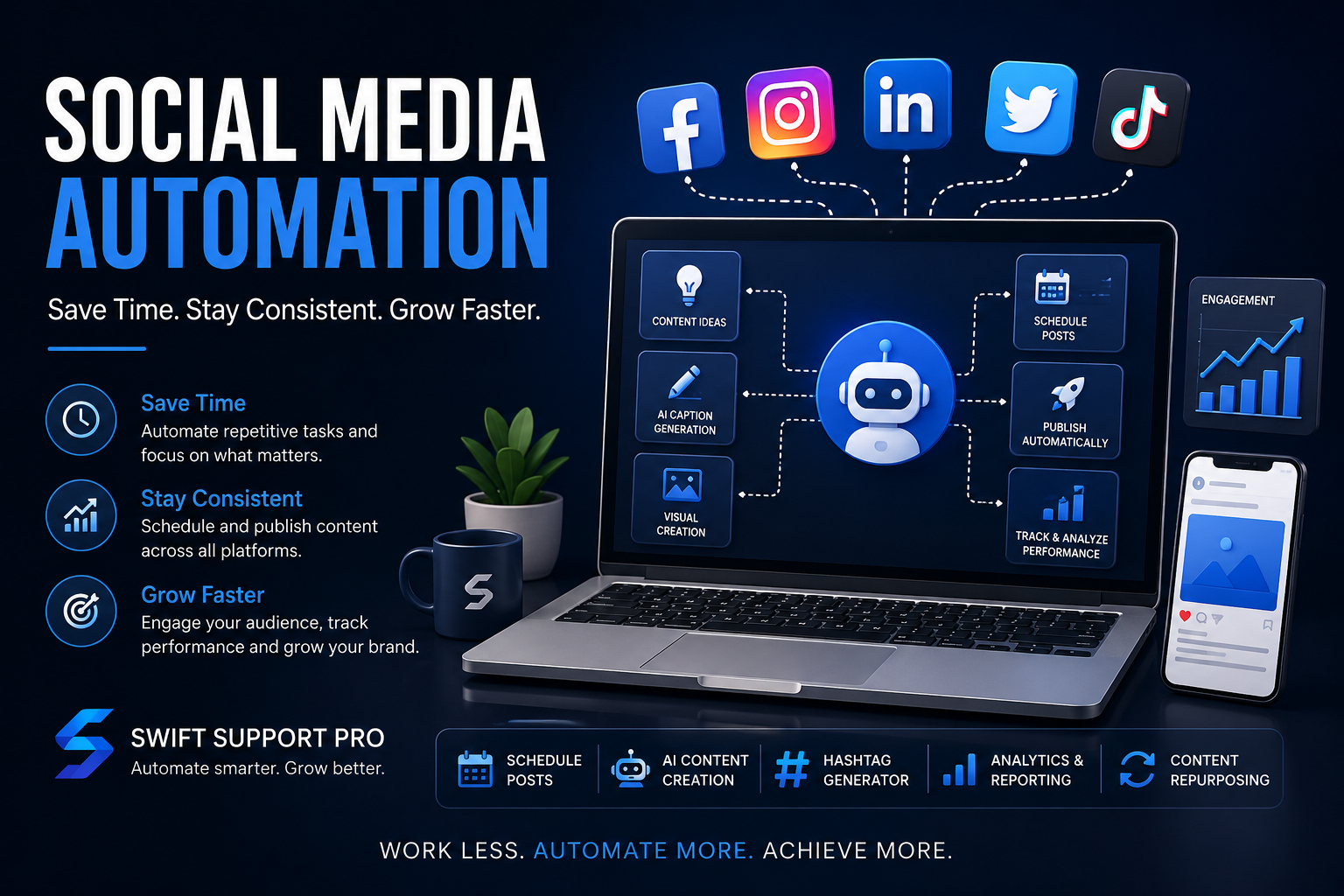
Social media automation isn’t limited to scheduling posts.
With modern AI and automation tools, businesses can automate many parts of their content workflow.
1. Content Ideas
Coming up with new content ideas every day can be challenging.
An AI-powered workflow can generate ideas based on:
- Your industry
- Target audience
- Products
- Services
- Current campaigns
- Frequently asked questions
- Previous successful posts
For example, an AI automation system for a digital marketing agency could generate content ideas such as:
Monday: Marketing tip
Tuesday: Educational post
Wednesday: Industry news
Thursday: Customer problem and solution
Friday: Case study
Saturday: Behind-the-scenes content
This creates a consistent content pipeline.
2. AI Caption Generation
Writing captions for every social media post can consume a lot of time.
AI can help create captions based on a simple topic or content idea.
For example, you could provide:
“Create a post explaining why businesses should automate repetitive tasks.”
The system could generate a complete caption with a hook, explanation, call-to-action, and relevant hashtags.
You can also create different writing styles depending on the platform.
For example:
- LinkedIn → Professional and informative
- Instagram → Short, engaging, and visual
- Facebook → Conversational and community-focused
- X → Short and direct
This allows the same idea to be transformed into platform-specific content.
3. Social Media Scheduling
Scheduling is one of the most common uses of automation.
Instead of logging into each platform every day, you can prepare content in advance and schedule it.
For example:
Monday: Educational post
Tuesday: Product post
Wednesday: Industry tip
Thursday: Customer story
Friday: Promotional post
Your automation system can organize the content and publish it according to your schedule.
This is especially useful for businesses that want to maintain a consistent posting frequency.
4. Image and Creative Generation
Visual content is an important part of modern social media.
AI image-generation tools can help businesses create graphics based on their content ideas.
For example:
Input:
“Create a professional social media graphic explaining three benefits of AI automation.”
The system can generate a visual that matches the topic.
You can also create templates for:
- Product promotions
- Educational posts
- Quotes
- Announcements
- Blog promotions
- Service advertisements
- Seasonal campaigns
Automation can then connect the generated image with the caption and publishing workflow.
5. Hashtag Generation
Finding relevant hashtags manually for every post can become repetitive.
An AI workflow can analyze the topic of a post and suggest relevant hashtags.
For example, a post about AI automation might receive hashtags such as:
#AIAutomation #Automation #ArtificialIntelligence #BusinessAutomation #DigitalTransformation
However, hashtags should be relevant to the actual content rather than simply adding a large number of popular tags.
6. Content Repurposing
One of the most powerful uses of automation is content repurposing.
Imagine you write one detailed blog article.
Instead of using it only once, automation can transform it into multiple pieces of content.
For example:
1 Blog Article → Multiple Social Posts
The system could create:
- 3 Facebook posts
- 3 LinkedIn posts
- 5 short-form posts
- 1 carousel concept
- 1 infographic idea
- Several short video ideas
This allows businesses to get much more value from the content they already created.
7. Automatically Promote Blog Posts
If your business publishes articles regularly, social media automation can help promote them.
For example:
New blog published → Automation detects article → AI reads article → Caption generated → Image created → Post scheduled → Social media platforms publish
This creates a content distribution system around your website.
Instead of remembering to promote every article manually, the workflow can handle the repetitive steps.
8. Customer Engagement Automation
Automation can also assist with basic customer interactions.
For example, businesses may receive repetitive questions such as:
- “What are your prices?”
- “Where are you located?”
- “What services do you offer?”
- “How can I contact you?”
- “What are your business hours?”
An automated system can help identify these common questions and provide appropriate responses or route them to a human team member.
For important or sensitive conversations, human review should remain part of the process.
9. Analytics and Reporting
Posting content is only part of social media marketing.
You also need to understand what is working.
Automation can collect information such as:
- Reach
- Impressions
- Engagement
- Likes
- Comments
- Shares
- Clicks
- Follower growth
This information can then be organized into reports.
For example, an automated weekly report could show:
Top-performing post: AI Automation Tips
Highest engagement: Educational content
Most clicks: Blog promotion
Best-performing platform: LinkedIn
This makes it easier to understand what your audience responds to.
How AI and Automation Work Together
Traditional automation follows predefined rules.
For example:
When a new blog is published → create a social media task.
AI adds another layer.
Instead of simply moving information from one application to another, AI can help understand and create content.
A modern workflow might look like this:
Blog Published
↓
AI Reads the Article
↓
AI Creates Content Ideas
↓
AI Writes Captions
↓
AI Suggests Hashtags
↓
Image Is Created
↓
Human Reviews Content
↓
Post Is Scheduled
↓
Performance Is Tracked
This combination can create a powerful content automation system.
Example: A Social Media Automation Workflow Using n8n
Platforms such as n8n can be used to build customized automation workflows.
Imagine a business stores its content ideas in a Google Sheet.
The workflow could work like this:
Step 1: Content Added
A team member adds a topic to the spreadsheet.
Example:
Topic: “5 Benefits of AI Chatbots for Small Businesses”
Step 2: Automation Detects the New Topic
The workflow checks the spreadsheet for new content ideas.
Step 3: AI Creates the Caption
An AI model creates a social media caption based on the topic.
Step 4: AI Creates Variations
The system can create different versions for different platforms.
Step 5: Visual Creation
An image-generation system creates a suitable graphic.
Step 6: Approval
The content is sent to a team member for review.
Step 7: Publishing
Once approved, the content is scheduled or published.
Step 8: Tracking
The workflow records the published content and can later collect performance information.
This creates a repeatable content pipeline.
The Benefits of Social Media Automation
Save Time
One of the biggest advantages is reducing repetitive manual tasks.
Instead of spending hours preparing individual posts, your team can focus on higher-value activities.
Improve Consistency
Automation makes it easier to maintain a regular publishing schedule.
Consistency is important because audiences are more likely to remember brands that communicate regularly.
Reduce Human Error
Manual processes can lead to mistakes such as forgetting hashtags, posting at the wrong time, or accidentally skipping a platform.
Automation can reduce these repetitive errors.
Scale Your Content
As your business grows, managing more content manually becomes increasingly difficult.
Automation allows you to build systems that can handle larger content volumes.
Better Organization
A centralized automation system can keep track of:
- Content ideas
- Captions
- Images
- Publishing dates
- Platforms
- Approval status
- Performance
This makes your content operation easier to manage.
Social Media Automation Doesn’t Mean “Set It and Forget It”
Automation is powerful, but it shouldn’t completely replace human involvement.
Social media is about communication, creativity, and relationships.
A fully automated account can sometimes feel repetitive or unnatural.
The best approach is usually:
AI + Automation + Human Creativity
Automation handles repetitive processes.
AI helps with research, ideas, writing, and content transformation.
Humans provide:
- Brand personality
- Creativity
- Strategy
- Opinions
- Customer relationships
- Final approval
This combination creates a much stronger social media system.
Common Mistakes to Avoid
Automating Everything
Not every social media activity should be automated.
Important conversations and customer interactions often need a human response.
Posting the Same Content Everywhere
Different platforms have different audiences and content styles.
A LinkedIn post shouldn’t necessarily be copied directly to Instagram or Facebook.
Ignoring Content Quality
Automation makes producing content easier, but quantity doesn’t automatically mean quality.
Always make sure content is useful, accurate, and relevant to your audience.
No Human Approval
For businesses, having an approval step can prevent incorrect information, poor wording, or off-brand content from being published.
Focusing Only on Posting
Social media isn’t only about publishing.
You should also monitor engagement, respond to customers, and analyze performance.
How Businesses Can Get Started
You don’t need to automate everything on day one.
Start with one repetitive process.
For example:
Step 1: Choose one platform.
Step 2: Identify one repetitive task.
Step 3: Build a simple automation.
Step 4: Test it.
Step 5: Add human approval.
Step 6: Measure the results.
Step 7: Expand the workflow.
Once the system works reliably, you can connect additional platforms and processes.
The Future of Social Media Automation
Social media automation is becoming increasingly connected with artificial intelligence.
Instead of simple scheduling systems, businesses can build intelligent workflows that understand content, generate new ideas, analyze performance, and recommend improvements.
The future of social media management is likely to involve systems where businesses provide their goals, brand information, products, and audience details while AI and automation handle much of the repetitive execution.
But human creativity will remain important.
The strongest brands will likely be the ones that use automation to increase human creativity rather than replace it.
Final Thoughts
Social media can be one of the most effective ways to grow a business, but managing it manually can become time-consuming.
Social media automation helps businesses save time, stay consistent, repurpose content, streamline publishing, and understand their performance.
When combined with AI, automation can go beyond simple scheduling. It can help with content ideas, captions, visuals, hashtags, content repurposing, reporting, and much more.
The key is to build automation around your business rather than simply automating everything.
At Swift Support Pro, we believe businesses should spend less time on repetitive tasks and more time focusing on growth.
⚡ Automate smarter. Work faster. Grow better.
Swift Support Pro — Your partner for AI automation and smarter digital workflows.
#SocialMediaAutomation #AIAutomation #MarketingAutomation #AI #BusinessAutomation #DigitalMarketing #SocialMediaMarketing #n8n #ContentAutomation #Automation